This is a work in progress. Visit mousefix.org
Kill Intro
Reload Intro
Trang này đã dịch được 72% sang
Bạn muốn giúp tôi dịch, nhấn đây!

Mac Mouse Fix
Biến chuột $10 của bạn tốt hơn Apple Trackpad
Tải xuống




Biến chuột $10 của bạn tốt hơn Apple Trackpad
Xem nhiều hơn
“
Mac Mouse Fix thật kì diệu. Tôi cực kì thích nó bởi thiết kế đẹp và tiện dụng cho người dùng.
“
Này gần như đã tăng gấp đôi năng suất của tôi.
“
Ứng dụng nên có cho mọi người dùng Mac với chuột.
“
Cuộn dọc thật là tuyệt vời!
“
Không thể tưởng tượng dùng office Mac không có phần mềm này. Nó năng suất thực sự phối với chuột thẳng đứng evoluent của tôi mà không có phần mềm cho Mac như họ làm cho Windows.
“
Rê & nhắp cho chuyển giữa các màn mượt mà.
“
Trong số tất cả ứng dụng giải quyết vấn đề này, cái này chắc chắn tốt nhất!
“
Tôi khuyên nên dùng Mac Mouse Fix vì nó thực sự rẻ, đơn giản và code tốt trong những ứng dụng tôi đã xem qua.
“
y là phần mềm chuột tốt nhất trên Mac.
“
Tôi đánh giá cao về sự đơn giản mà bạn làm.
“
Đây là phần mềm tốt và giải quyết hết vấn đề trên con chuột của tôi.
“
Nó hoạt động tuyệt vời với chuột của tôi
“
Ứng dụng tốt. Cảm ơn bạn đóng góp cho mã nguồn mở.
“
Tôi đã và đang tìm kiếm ứng dụng tương tự trong một thời gian dài, và sau cùng là thấy một này 👍
“
Cám ơn về ứng dụng tuyệt vời Mac Mouse Fix. Đúng thứ tôi cần, không có phí và quảng cáo. Cám ơn bạn rất nhiều!
“
Yêu ứng dụng này rất nhiều, nên có trong máy!
“
Giao diện phiên bản 2 nhìn rất đẹp và trực quan.
“
Ứng dụng này sẽ làm chuột giá rẻ của bạn hoạt động tốt hơn cử chỉ của Trackpad
“
Ứng dụng tuyệt vời, tôi sẽ chia sẻ nó cho mọi người cùng biết 😁
“
Có lẽ ứng dụng tốt nhất trên máy Mac của tôi
“
Mac Mouse Fix là tất cả bạn muốn cho trải nghiệm dùng chuột với OSX.
“
Ứng dụng của bạn là tuyệt vời và hết sức quan trọng với công việc của tôi.
“
Ứng dụng tốt! Thật sự yêu! Con lăn Logitech của tôi có thêm tính năng kể từ giờ.
“
Hết sức hiệu quả và dễ cài đặt!
“
Ứng dụng này thật sự tốt!
“
Cám ơn, tôi đỡ tốn tiền mua chuột apple
“
Bạn đã làm superlight của tôi hay hơn mx master.
“
Mac Mouse Fix thật tuyệt vời!
“
Đây là phần mềm vĩ đại nhất của trong lịch sử của Apple.
“
Cám ơn, ứng dụng tốt ghia
“
Công cụ của bạn là cách duy nhất tôi có thể sử dụng macOS (với chuột) không có phản ứng mạnh mẽ ra!
“
Cám ơn bạn về chuyện này, tôi không hiểu tại sao Apple không làm điều này mặc định, như thể nó là siêu trực quan về cử chỉ với nút giữa.
“
Sau khi chuyển sang chuột, tôi đã thử phần mềm như là SteerMouse, nhận đề xuất nhiều và còn có cả lệ phí nữa, và sau cùng là nhận thấy là phần mềm này đáp ứng nhu cầu của tôi hoàn hảo, mọi tính năng là rất hữu ích, và việc thực hiện là rất tốt!
“
Không có tiện ích tương tự khác nào cạnh tranh
“
Tôi đã và đang muốn thoát khỏi Magic Mouse trong một khoảng thời gian và vì ứng dụng của bạn, tôi có thể làm điều đó!
“
Tôi đã không dùng ứng dụng tuần vừa qua và toàn bộ công việc tôi bị bế tắc. Cám ơn vì ứng dụng xuất sắc.
“
ỨNG DỤNG SIÊU XỊN
Cám ơn mọi người đã chia sẻ cảm nhận và phản hồi trong những năm qua! Đọc những tin nhắn ấy luôn làm tôi có động lực hơn :)
Macs Tốt Nhất
Với Bàn di chuộtChuột.
That's right! Mac Mouse Fix brings all features of an Apple Trackpad - and more - to your precise and ergonomic third-party mouse. And all interactions feel just as smooth and natural as they do on a Trackpad.
Trackpad Gestures that Mac Mouse Fix brings to your mouse


Tra cứu & Xem nhanh
Click button 4 on your mouse to look up a word in the dictionary, preview websites in Safari or files in Finder, and more.
It works just like tapping with 3 fingers or force clicking on an Apple Trackpad.
Mission Control
Hold down button 4 on your mouse, then drag the mouse up to see an overview of your open windows, applications, and desktops.
It works just like swiping up with four fingers on an Apple Trackpad.
Di chuyển giữa các màn hình nền
Hold down button 4 on your mouse, then drag the mouse left or right to move to another desktop or fullscreen-app.
It works just like swiping left or right with four fingers on an Apple Trackpad.
Duyệt các ứng dụng đang mở
Hold down button 4 on your mouse, then drag the mouse down to see all windows of the app you're using.
It works just like swiping down with four fingers on an Apple Trackpad.
Hiện màn hình nền
Hold down button 4 on your mouse, then scroll up to show your desktop.
It works just like spreading your thumb and three fingers apart on an Apple Trackpad.
Launchpad
Hold down button 4 on your mouse, then scroll down to display Launchpad.
It works just like pinching your thumb and three fingers together on an Apple Trackpad.
Phóng to hoặc thu nhỏ
Hold down button 5 on your mouse, then scroll up or down to zoom in or out in apps like Safari and Preview.
It works just like pinching with two fingers on an Apple Trackpad.
Trở về và đi tới
Hold down button 5 on your mouse, then drag the mouse left or right to show the previous or next page in apps like Safari.
It works just like swiping left or right with two fingers on an Apple Trackpad.
Xoá thư điện tử nhánh chóng và hơn thế nữa
Hold down button 5 on your mouse, then drag the mouse left or right to delete messages in Mail, quickly reply to an iMessage, and more.
Any gesture you can perform inside an app by swiping on an Apple Trackpad works just as well using Mac Mouse Fix.
Cuộn 360° chính xác
Hold down button 5 on your mouse, then drag the mouse in any direction to precisely scroll with 360° freedom and an intuitive inertial effect. So you can navigate the canvas with ease in pro apps like Excel or Affinity Photo.
It's just as easy and precise as scrolling on an Apple Trackpad.
Thu phóng thông minh
Click button 5 on your mouse to zoom in and back out of a webpage or PDF.
It works just like double-tapping with two fingers on an Apple Trackpad.
Note: Mac Mouse Fix can bring these Trackpad features to your third-party mouse as described here, only if your mouse has at least 5 buttons. These 5 buttons are typically left-click, right-click, mouse-wheel click, and 2 side-buttons. If your mouse has fewer than 5 buttons, Mac Mouse Fix still provides rich functionality and a great experience, but some features will be less easy to access compared to a 5-button mouse. On certain mice designed to be used with proprietary driver software like Logitech Options, Mac Mouse Fix can't recognize all the buttons at the moment. Mac Mouse Fix does not currently support the Apple Magic Mouse.
Cuộn. Siêu mượt mà.
Scrolling with a third-party mouse on macOS can feel stuttery and hard to control. Well, not any more! Experience a refined, momentum-based scrolling algorithm that makes navigating your computer effortless and natural.
Chọn cuộn mượt mà
Độ mượt: Cao
With Smoothness: High, scrolling feels incredibly smooth - just like a Trackpad. Details like the subtle bounce at the end of a page make for a dynamic and pleasant feel. Still, scrolling is super responsive and easy to control. With this option, you can also scroll large distances very easily.
Độ mượt: Bình thường
Choose Smoothness: Regular for highly responsive scrolling that feels like you're directly pushing the page with your finger. The short, momentum-based animations provide a refined feel.
This option feels similar to scrolling in Chrome or modern Windows apps.
Độ mượt: Tắt
With Smoothness: Off, scrolling works as it normally does under macOS - without any animation or smoothing. But with one key difference: One increment of the scroll wheel will scroll a set number of lines, rather than just a few pixels, making navigation more consistent and comfortable.
This is how scrolling also works in most apps on Windows and Linux, as well as older macOS versions.
... Và Hơn thế nữa
Hướng cuộn
Mac Mouse Fix lets you change the scrolling direction of your mouse - independently from your Trackpad or Magic Mouse.
Kết hợp bàn phím
Hold a keyboard modifier while scrolling to scroll precisely, zoom in or out, and more.
Đơn giản nhưng mạnh
You can set up scrolling in Mac Mouse Fix in many different ways with just a few clicks. All options you choose will feel great without fiddling. Each scrolling enhancement provided by Mac Mouse Fix can also be turned off, if you prefer how things work natively in macOS.
Linh hoạt và Trực quan xuất sắc.
Mac Mouse Fix lets you do almost anything you can think of - straight from your mouse! And yet, it's remarkably easy to use.
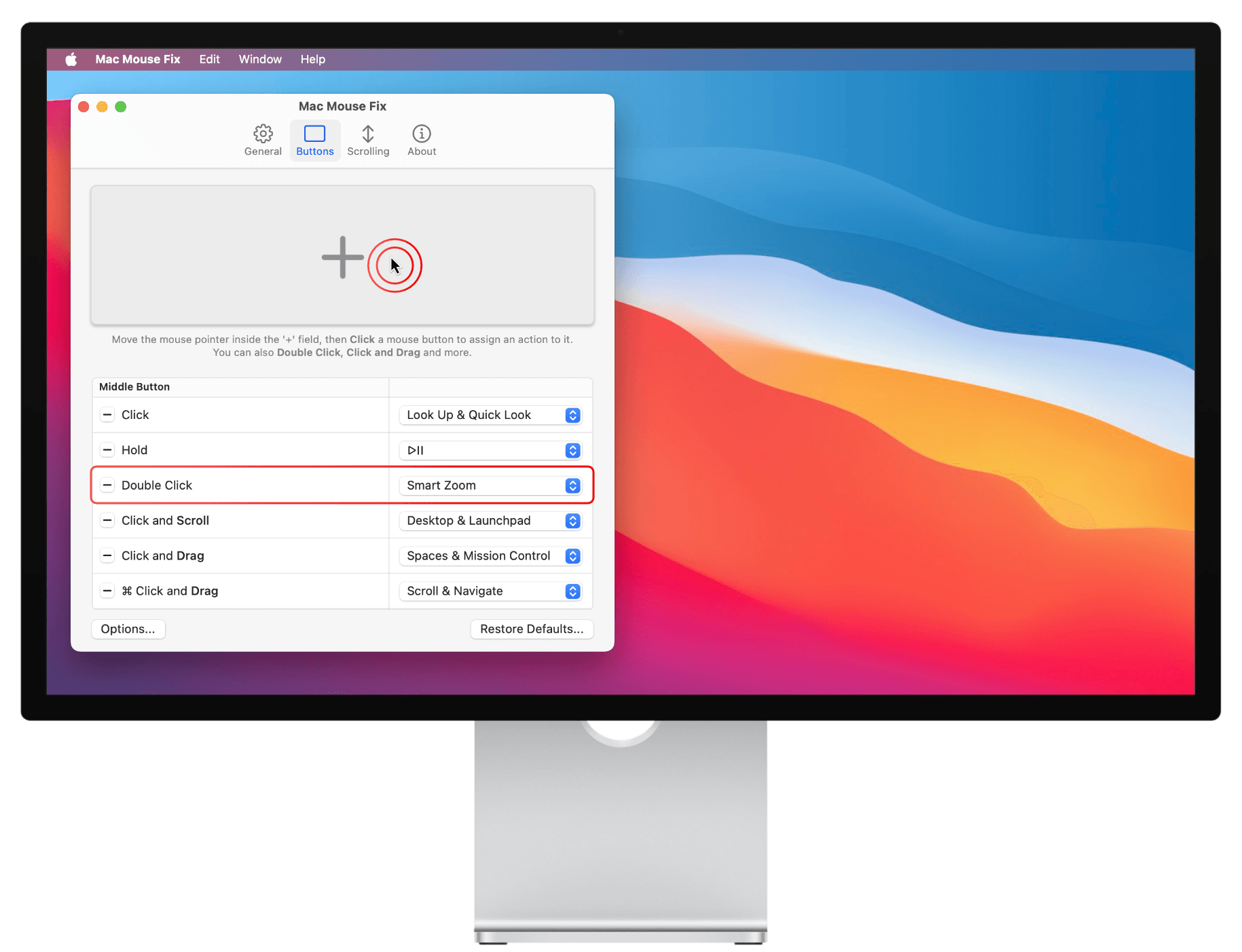
Add Actions to your mouse
To add an action to your mouse:
- Move the mouse pointer inside the '+'-field. (Shown below)
- Click the mouse button you want to assign an action to.
You can also Double Click, Click and Drag, and much more! - Choose an action, such as Smart Zoom.
And that's it!
Use Keyboard Shortcuts from your mouse
Mac Mouse Fix lets you do anything you can do with a keyboard shortcut straight from your mouse. For example, you can copy and paste, change the audio volume, open a new tab in Safari, and much more.
Great Software. Great Giá.
I strive to make Mac Mouse Fix a software that you can feel great about installing. I want to offer it as cheaply as possible, so you feel like you're getting a great deal and so that everyone can afford it. And ultimately, I hope to make this tiny corner of the world a little more awesome and nice!
Ứng dụng tốt
Unobtrusive. Lightweight. Beautiful.
Every detail of Mac Mouse Fix has been considered and optimized to give you the best possible experience while feeling like a natural extension of your Mac. I've invested countless hours to make sure that Mac Mouse Fix uses no more battery or memory than absolutely necessary. The goal is that you won't even notice Mac Mouse Fix on your computer - except of course, when using your mouse.
Mã nguồn mở
The source code of Mac Mouse Fix is available on GitHub, so everyone can see exactly how it works. This helps with the development, and it means you can be sure that Mac Mouse Fix is secure and trustworthy, that it protects your privacy, and that it doesn't do anything when it runs in the background - except bringing your mouse experience to the next level!
... Giá tốt
Miễn phí dùng 30 ngày
Mac Mouse Fix is free for 30 days. Your free days are only used up when you actually use the app. That way you can get the most out of your free days - without any stress.
Note on price: The price of $2.99 does not include local taxes, which might have to be paid in your region. To see your total price, visit the checkout page. If you pay on Gumroad.com via PayPal in a currency other than Euros, PayPal will charge an additional 4.5% currency conversion fee.
I would like to include these fees in the price - to make the buying experience simpler and clearer. But this is currently not possible due to limitations with the sales platform Gumroad.com. I hope the price still feels very fair and cheap.
Được tạo bởi Noah Nuebling
Cảm ơn 