This is a work in progress. Visit mousefix.org
Kill Intro
Reload Intro
Cette page est traduite à 50% % en .
Pour aider à la traduction, cliquez ici !

Mac Mouse Fix
Rendez votre souris à 10 $ meilleure qu'un trackpad Apple !
Télécharger




Rendez votre souris à 10 $ meilleure qu'un trackpad Apple !
Voir plus
“
Mac Mouse Fix est magique. Je suis absolument impressionné par sa conception et sa convivialité.
“
Cela a presque doublé ma productivité.
“
Une application indispensable pour tout utilisateur Mac équipé d'une souris.
“
Le défilement vertical est tout simplement génial.
“
Je ne peux pas imaginer utiliser mon Mac au bureau sans ce logiciel. Il améliore vraiment ma productivité, surtout avec ma souris verticale Evoluent qui n'a pas de pilote pour Mac comme pour Windows.
“
Cliquer et faire glisser pour passer d'un écran à l'autre semble tellement naturel.
“
Parmi toutes les applications qui tentent de résoudre ce problème, celle-ci est sans aucun doute la meilleure !
“
Je recommande Mac Mouse Fix, honnêtement, c'est l'application la moins chère, la plus simple et la mieux codée que j'ai vue jusqu'à présent.
“
C'est le meilleur logiciel pour souris sur Mac.
“
J'apprécie vraiment la simplicité que cela apporte.
“
C'est un excellent logiciel qui a résolu tous mes problèmes de souris.
“
Il fonctionne parfaitement avec ma souris.
“
Magnifique logiciel libre. Merci pour votre contribution à la cause open source.
“
Je cherchais depuis longtemps une application similaire, et j'ai enfin trouvé celle-ci, bravo 👍.
“
Merci pour cette application géniale, Mac Mouse Fix. C'est exactement ce dont j'avais besoin, sans abonnement ni fonctionnalités superflues. Merci beaucoup !
“
J'adore cette application, c'est un incontournable !
“
L'interface utilisateur de la version 2 est fantastique et très intuitive.
“
Cette application rend votre souris bon marché plus performante que les gestes du pavé tactile.
“
Super application, elle mérite vraiment d'être largement partagée avec d'autres 😁
“
Probablement la meilleure application sur mon Mac.
“
Mac Mouse Fix est littéralement tout ce que vous pouvez souhaiter pour votre expérience d'utilisation d'une souris avec OSX.
“
Votre application est incroyable et absolument indispensable à mon flux de travail.
“
Produit incroyable ! Je l'adore ! Ma boule de commande Logitech est désormais comme une extension de moi-même.
“
Fonctionne à merveille et est facile à configurer !
“
Ce logiciel est génial !
“
Merci, ça m'a évité d'acheter une souris Apple.
“
Vous avez rendu ma souris superlégère meilleure qu'une MX Master.
“
Mac Mouse Fix est le meilleur de sa catégorie !
“
Il s'agit du meilleur logiciel jamais créé dans l'histoire d'Apple.
“
Merci, l'application est vraiment géniale.
“
Votre outil est littéralement le seul moyen qui me permette d'utiliser macOS (en particulier avec une souris) sans paniquer !
“
Merci pour cette information, je ne comprends pas pourquoi Apple n'a pas fait cela par défaut, car il est très intuitif d'effectuer des gestes avec le clic central.
“
Après être passé à une souris, j'ai essayé des logiciels tels que SteerMouse, qui m'avait été recommandé à plusieurs reprises et qui est même payant, et j'ai finalement trouvé que ce logiciel répondait parfaitement à mes besoins, que toutes ses fonctionnalités étaient très utiles et que ses performances étaient excellentes !
“
Aucun autre utilitaire similaire ne peut rivaliser.
“
Cela fait un moment que je souhaite me débarrasser de ma Magic Mouse, et grâce à votre application, je peux enfin le faire !
“
Je l'ai passée sans et tout mon travail a été interrompu. Merci pour cette application géniale.
“
SUPER BELLE APPLICATION
Merci à tous ceux qui ont partagé leur appréciation et leurs commentaires au fil des ans ! Lire vos gentils messages est toujours motivant :)
Les Macs sont Meilleurs Avec un Pavé tactileSouris.
C'est vrai ! Mac Mouse Fix apporte toutes les fonctionnalités d'un trackpad Apple, et bien plus encore, à votre souris tierce précise et ergonomique. Et toutes les interactions sont aussi fluides et naturelles que sur un trackpad.
Trackpad Gestures that Mac Mouse Fix brings to your mouse


Look up and Quick Look
Click button 4 on your mouse to look up a word in the dictionary, preview websites in Safari or files in Finder, and more.
It works just like tapping with 3 fingers or force clicking on an Apple Trackpad.
Mission Control
Hold down button 4 on your mouse, then drag the mouse up to see an overview of your open windows, applications, and desktops.
It works just like swiping up with four fingers on an Apple Trackpad.
Move between desktops
Hold down button 4 on your mouse, then drag the mouse left or right to move to another desktop or fullscreen-app.
It works just like swiping left or right with four fingers on an Apple Trackpad.
App Exposé
Hold down button 4 on your mouse, then drag the mouse down to see all windows of the app you're using.
It works just like swiping down with four fingers on an Apple Trackpad.
Show desktop
Hold down button 4 on your mouse, then scroll up to show your desktop.
It works just like spreading your thumb and three fingers apart on an Apple Trackpad.
Hold down button 4 on your mouse, then scroll down to display Launchpad.
It works just like pinching your thumb and three fingers together on an Apple Trackpad.
Zoom in or out
Hold down button 5 on your mouse, then scroll up or down to zoom in or out in apps like Safari and Preview.
It works just like pinching with two fingers on an Apple Trackpad.
Go back and forward
Hold down button 5 on your mouse, then drag the mouse left or right to show the previous or next page in apps like Safari.
It works just like swiping left or right with two fingers on an Apple Trackpad.
Delete mails quickly and more
Hold down button 5 on your mouse, then drag the mouse left or right to delete messages in Mail, quickly reply to an iMessage, and more.
Any gesture you can perform inside an app by swiping on an Apple Trackpad works just as well using Mac Mouse Fix.
Precise 360° scrolling
Hold down button 5 on your mouse, then drag the mouse in any direction to precisely scroll with 360° freedom and an intuitive inertial effect. So you can navigate the canvas with ease in pro apps like Excel or Affinity Photo.
It's just as easy and precise as scrolling on an Apple Trackpad.
Smart zoom
Click button 5 on your mouse to zoom in and back out of a webpage or PDF.
It works just like double-tapping with two fingers on an Apple Trackpad.
Note: Mac Mouse Fix can bring these Trackpad features to your third-party mouse as described here, only if your mouse has at least 5 buttons. These 5 buttons are typically left-click, right-click, mouse-wheel click, and 2 side-buttons. If your mouse has fewer than 5 buttons, Mac Mouse Fix still provides rich functionality and a great experience, but some features will be less easy to access compared to a 5-button mouse. On certain mice designed to be used with proprietary driver software like Logitech Options, Mac Mouse Fix can't recognize all the buttons at the moment. Mac Mouse Fix does not currently support the Apple Magic Mouse.
Scrolling. Smooth As Butter.
Scrolling with a third-party mouse on macOS can feel stuttery and hard to control. Well, not any more! Experience a refined, momentum-based scrolling algorithm that makes navigating your computer effortless and natural.
Choose a Scrolling Smoothness ...
Smoothness: High
With Smoothness: High, scrolling feels incredibly smooth - just like a Trackpad. Details like the subtle bounce at the end of a page make for a dynamic and pleasant feel. Still, scrolling is super responsive and easy to control. With this option, you can also scroll large distances very easily.
Smoothness: Regular
Choose Smoothness: Regular for highly responsive scrolling that feels like you're directly pushing the page with your finger. The short, momentum-based animations provide a refined feel.
This option feels similar to scrolling in Chrome or modern Windows apps.
Smoothness: Off
With Smoothness: Off, scrolling works as it normally does under macOS - without any animation or smoothing. But with one key difference: One increment of the scroll wheel will scroll a set number of lines, rather than just a few pixels, making navigation more consistent and comfortable.
This is how scrolling also works in most apps on Windows and Linux, as well as older macOS versions.
... And More
Scrolling direction
Mac Mouse Fix lets you change the scrolling direction of your mouse - independently from your Trackpad or Magic Mouse.
Keyboard modifiers
Hold a keyboard modifier while scrolling to scroll precisely, zoom in or out, and more.
Simple yet powerful
You can set up scrolling in Mac Mouse Fix in many different ways with just a few clicks. All options you choose will feel great without fiddling. Each scrolling enhancement provided by Mac Mouse Fix can also be turned off, if you prefer how things work natively in macOS.
Amazingly Flexible and Intuitive.
Mac Mouse Fix lets you do almost anything you can think of - straight from your mouse! And yet, it's remarkably easy to use.
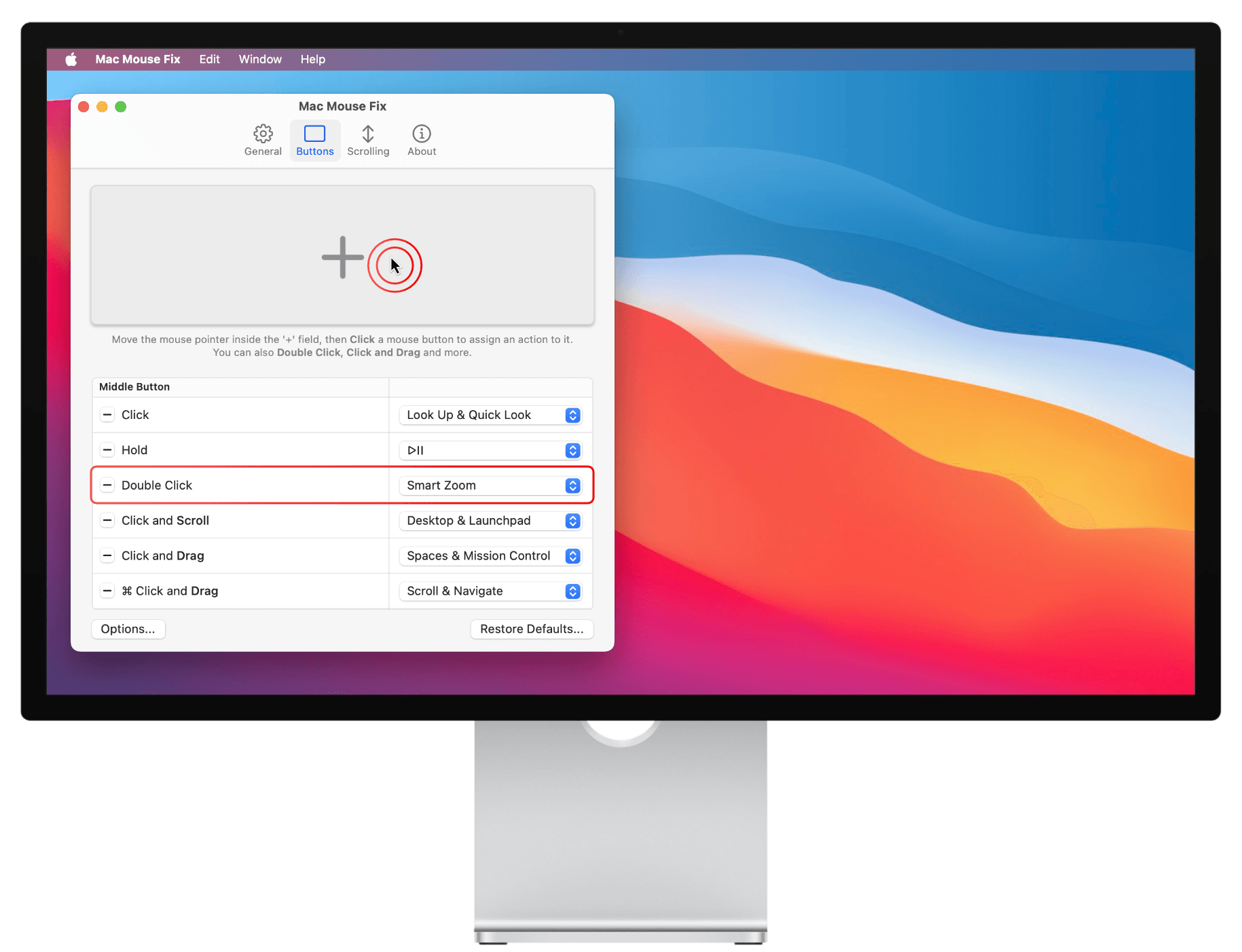
Add Actions to your mouse
To add an action to your mouse:
- Move the mouse pointer inside the '+'-field. (Shown below)
- Click the mouse button you want to assign an action to.
You can also Double Click, Click and Drag, and much more! - Choose an action, such as Smart Zoom.
And that's it!
Use Keyboard Shortcuts from your mouse
Mac Mouse Fix lets you do anything you can do with a keyboard shortcut straight from your mouse. For example, you can copy and paste, change the audio volume, open a new tab in Safari, and much more.
Great Software. Great Price.
I strive to make Mac Mouse Fix a software that you can feel great about installing. I want to offer it as cheaply as possible, so you feel like you're getting a great deal and so that everyone can afford it. And ultimately, I hope to make this tiny corner of the world a little more awesome and nice!
Great Software ...
Unobtrusive. Lightweight. Beautiful.
Every detail of Mac Mouse Fix has been considered and optimized to give you the best possible experience while feeling like a natural extension of your Mac. I've invested countless hours to make sure that Mac Mouse Fix uses no more battery or memory than absolutely necessary. The goal is that you won't even notice Mac Mouse Fix on your computer - except of course, when using your mouse.
Open source
The source code of Mac Mouse Fix is available on GitHub, so everyone can see exactly how it works. This helps with the development, and it means you can be sure that Mac Mouse Fix is secure and trustworthy, that it protects your privacy, and that it doesn't do anything when it runs in the background - except bringing your mouse experience to the next level!
... Great Price
Free for 30 Days
Mac Mouse Fix is free for 30 days. Your free days are only used up when you actually use the app. That way you can get the most out of your free days - without any stress.
Note on price: The price of $2.99 does not include local taxes, which might have to be paid in your region. To see your total price, visit the checkout page. If you pay on Gumroad.com via PayPal in a currency other than Euros, PayPal will charge an additional 4.5% currency conversion fee.
I would like to include these fees in the price - to make the buying experience simpler and clearer. But this is currently not possible due to limitations with the sales platform Gumroad.com. I hope the price still feels very fair and cheap.
Créé par Noah Nuebling
Merci pour vos téléchargements 